
AI animation tools make it possible to turn a single image into motion in minutes. Whether you want subtle depth, talking avatars, stylized motion, or a simple 3D scene, there are now easy options that work with AI art, digital illustrations, and even regular photos.
This guide covers practical AI animation tools for different use cases, including free options, freemium platforms, and more advanced tools for higher-quality results. It also explains which tool is best for each goal, how to get better output, and what to avoid.
What are AI animation tools?
AI animation tools are apps and platforms that add movement to static images. Depending on the tool, that movement might be:
- Depth-based parallax effects
- 3D zoom motion
- Character motion
- Lip-synced talking faces
- Prompt-based image-to-video generation
- 2D image to 3D environment conversion
Some tools are almost instant and require only an upload. Others give more control over motion, style, camera movement, or facial expression.
Who should use AI animation tools?
These tools are useful for:
- Social media creators
- Short-form video editors
- AI art users
- Faceless content creators
- Marketers making lightweight motion graphics
- Anyone experimenting with still-image animation
Most of the tools below work with images from Midjourney, Leonardo, BlueWillow, other image generators, and standard photos.
How to choose the right AI animation tool
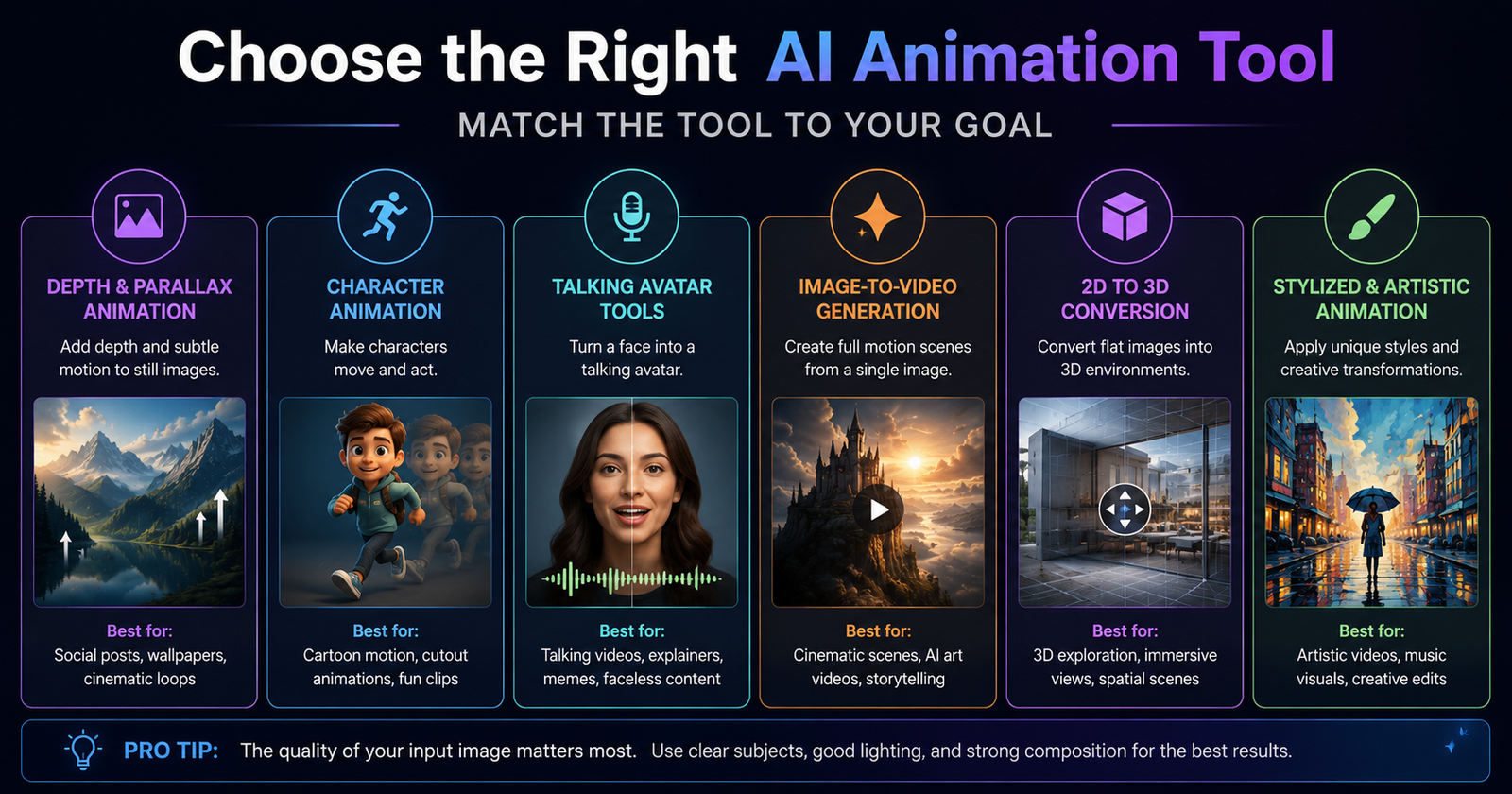
Not all AI animation tools do the same job. The fastest way to choose is by desired output.
Use a depth animation tool if you want:
- A subtle cinematic effect
- A quick social media loop
- An immersive parallax look
Use a character animation tool if you want:
- A figure to move its limbs
- A playful animated character
- A simple cutout-style motion result
Use a talking avatar tool if you want:
- A face to speak a script
- Lip-sync from uploaded audio
- Meme clips or avatar content
Use an image-to-video generator if you want:
- More dramatic movement
- Scene transformation
- Creative stylization and camera motion
Best AI animation tools by use case
1. LeiaPix for immersive depth animation
LeiaPix is one of the easiest AI animation tools for creating motion from a single image. Upload an image and it generates a depth-based animation with adjustable movement and timing.
Best for: quick parallax effects, looping motion, social posts
Why it stands out:
- Very fast setup
- Good-looking depth animations from one image
- Includes export options and an advanced editor
- Can also generate a depth map for other workflows
Helpful tip: If you need a depth map for another tool, lowering edge dilation can improve the result for that specific use.
2. CapCut mobile for 3D zoom animation
CapCut is not primarily an AI app, but its mobile 3D zoom effect remains one of the quickest ways to add motion to still images. Start a project, add a photo, and apply the 3D zoom or 3D zoom Pro style.
Best for: dramatic push-in effects, short edits, mobile-first content
What to know:
- The 3D zoom feature works on the phone app
- Results depend heavily on image composition
- Strong foreground and background separation helps
3. Pika for prompt-based image animation
Pika is one of the more flexible AI animation tools for turning still images into moving scenes. You upload an image, describe the motion you want, and generate an animated result.
Best for: cinematic motion, stylized scene movement, AI art animation
Why it is useful:
- Lets you direct movement with text
- Works with a reference image
- Also supports text-to-video generation
Ideal use case: When a simple depth effect is not enough and you want the scene itself to feel alive.
4. InstaVerse for turning 2D images into 3D spaces
InstaVerse from ilumine AI focuses on converting a 2D image into a navigable 3D environment. It works best when paired with a depth map.
Best for: exploring an image as a 3D scene, immersive visual experiments
Basic workflow:
- Upload your image as the 2D texture.
- Generate a depth map in another tool such as LeiaPix.
- Upload the depth map.
- Move around the generated environment.
This is one of the most interesting AI animation tools if your goal is not just motion, but spatial exploration.
5. Animated Drawings for simple character motion
Animated Drawings, a research project from Meta, is designed to animate character drawings. It works best when the character is on a white background with visible, separate limbs.
Best for: playful character animation, simple motion tests, stylized figures
Image requirements matter:
- White background
- Full body visible
- Clear arm and leg separation
- Minimal overlap between limbs
If your image has a background, remove it first and replace it with white. This significantly improves the tool’s ability to detect the figure.
6. Genmo for fast creative image animation
Genmo is one of the most versatile AI animation tools in this list. You can upload an image and either describe the animation in a guided workflow or interact through chat to refine the result.
Best for: experimental motion, iterative edits, animated art styles
Useful controls include:
- Animation length
- Dynamism or variation between frames
- Reference image guidance
- Region-specific animation
A practical strength of Genmo is that it supports both broad experimentation and more targeted adjustments.
7. D-ID for talking avatars
D-ID is built for creating speaking avatars from a face image. Upload a portrait, add a script or audio, choose a voice if needed, and generate a talking face.
Best for: avatar explainers, character speech, simple face animation
Good to know:
- You can type a script or upload audio
- Works well for short-form avatar content
- Includes a free usage tier before paid plans
Among AI animation tools, this is one of the clearest choices when lip-sync is the primary goal.
8. HeyGen for avatar-style face animation
HeyGen offers a similar workflow to D-ID for turning a still face into a speaking avatar. It also includes additional avatar-related features.
Best for: talking-head style content, easy avatar generation
Why some users prefer it:
- Simple workflow
- Useful for meme-style or faceless content formats
- Can be more forgiving with certain face uploads
9. SadTalker for a fully free talking face option
SadTalker on Hugging Face is a strong option if you want free talking-head animation and are willing to accept slower generation times.
Best for: free lip-sync animation, budget workflows, more manual control
Typical setup includes:
- Upload a source image
- Upload audio
- Adjust expression scale
- Choose a face model resolution
- Use full preprocessing if you want the result fit to the original frame
- Use GFPGAN for improved quality
It may take much longer than commercial tools, but for fully free AI animation tools, SadTalker is a strong option.
10. Kaiber for stylized animated videos
Kaiber is broader than a simple image animation tool. You can start with an image, describe the output, pick a style, and control how calm or wild the animation becomes.
Best for: artistic motion, evolving visuals, stylized short videos
Key strengths:
- Can animate from a still image
- Offers style choices and creative transformations
- Useful when you want more than subtle motion
The free use is more limited because it is mainly a trial before paid plans.
11. Runway for high-quality image-to-video generation
Runway is a full creative suite, and its image-to-video workflow can produce some of the strongest results among current AI animation tools. It can work especially well when you upload an image without adding a text prompt, allowing the image to drive the generation more directly.
Best for: premium-looking image animation, high-quality experimental results
Important limitation:
- Generations can be credit-intensive
- Results are less controllable in some image-prompting cases
- Sometimes the output changes very little, which wastes credits
When it works well, the quality can be excellent. The tradeoff is cost and consistency.
Best free AI animation tools
If budget matters most, these are the most accessible AI animation tools from this list:
- LeiaPix for depth motion
- CapCut for mobile 3D zoom
- Pika for image-based scene animation
- InstaVerse for 2D to 3D scene conversion
- Animated Drawings for character movement
- Genmo for flexible image animation with daily usage limits
- SadTalker for fully free talking faces
If you need a free starting point, LeiaPix, Pika, Genmo, and SadTalker cover four very different workflows.
Best AI animation tools by goal
For social media posts
- LeiaPix
- CapCut
- Genmo
For cinematic AI art animation
- Pika
- Genmo
- Runway
- Kaiber
For talking portrait videos
- D-ID
- HeyGen
- SadTalker
For converting flat images into 3D experiences
- InstaVerse
- LeiaPix for depth map support
For character-based motion
- Animated Drawings
How to get better results from AI animation tools
The quality of your input image often matters more than the tool itself. Good AI animation tools still depend on strong source material.
Use images with clear depth
Foreground, subject, and background separation improve depth animation and 3D zoom effects.
Choose clean compositions
Busy images make it harder for motion tools to interpret the scene correctly.
Match the tool to the image
A portrait is better for talking avatars. A landscape or environmental image is better for depth motion. A full-body figure with visible limbs is better for character animation.
Give motion instructions that are specific
For prompt-based tools, a brief but clear instruction usually works better than a vague request. Focus on subject movement, camera motion, or scene behavior.
Expect some iteration
Many AI animation tools produce better results after one or two retries, especially image-to-video generators.
Common mistakes to avoid
Using low-quality images
Blurry, flat, or poorly composed images usually create weaker animation.
Ignoring background removal for character tools
If a tool expects a clean white background, do that prep first.
Overlapping limbs in character animation
When arms or legs are hidden, the tool may fail to map joints correctly.
Expecting full control from every image-to-video tool
Some tools prioritize creative generation over precision. This is especially important when using credit-based platforms.
Skipping depth maps when needed
For 2D-to-3D conversions, the depth map can make the difference between a convincing result and a distorted one.
Can AI animation tools work with real photos?
Yes. Many AI animation tools work with regular photographs, not just AI-generated art. Depth animation, talking avatar tools, and some image-to-video generators can all work with real photos.
The exception is character-specific tools that expect a simplified figure layout, such as a drawing on a white background.
Are AI animation tools good for beginners?
Yes. Several AI animation tools are beginner-friendly because they require little more than uploading an image and selecting a setting. The easiest options for beginners are:
- LeiaPix
- CapCut
- D-ID
- HeyGen
More experimental tools like Genmo, Pika, Kaiber, and Runway can still be beginner-friendly, but results improve when you learn how to guide motion more intentionally.
Which AI animation tool is best overall?
There is no single best choice for everyone. The best AI animation tools depend on what you want to create.
- Best for quick depth motion: LeiaPix
- Best for mobile zoom effects: CapCut
- Best for prompt-driven image animation: Pika or Genmo
- Best for talking avatars: D-ID, HeyGen, or SadTalker
- Best for 2D-to-3D environments: InstaVerse
- Best for premium image-to-video quality: Runway
- Best for stylized evolving video: Kaiber
Simple workflow ideas
Workflow 1: Fast social clip
- Create or choose a strong still image.
- Animate it in LeiaPix or CapCut.
- Export and add music or text in your editor.
Workflow 2: Talking character post
- Prepare a face image.
- Generate speech in D-ID, HeyGen, or SadTalker.
- Place the result over a background or edit it into a short clip.
Workflow 3: Immersive 3D scene
- Generate a depth map in LeiaPix.
- Upload image and depth map to InstaVerse.
- Explore and capture movement in the 3D environment.
Workflow 4: Creative AI art animation
- Upload a still image to Pika, Genmo, Kaiber, or Runway.
- Describe motion or experiment with settings.
- Render several versions and keep the strongest result.
Final takeaway
The current generation of AI animation tools makes it easy to turn a static image into something far more engaging. Some tools focus on speed, some on lip-sync, some on 3D depth, and some on full image-to-video generation.
If you want the easiest starting point, begin with LeiaPix, CapCut, or Genmo. If you need talking faces, use D-ID, HeyGen, or SadTalker. If your goal is higher-end visual motion, explore Pika, Kaiber, or Runway.
The biggest factor in success is still the source image. Start with a strong visual, match it to the right tool, and you can get impressive animation in very little time.